
Best Computer Monitors for Every Setup and Budget
As an Amazon Associate I earn from qualifying purchases. Some links may earn us a commission at no extra cost to you.
I spend more hours staring at monitors than I care to admit, so picking the right panel matters enormously for my eyes, productivity, and gaming sessions. After comparing panel types, refresh rates, and color accuracy across dozens of models, these five monitors stand out at every price tier.
How I researched
I measured color gamut coverage with a calibration tool, tested pixel response times with pursuit photography, and compared adaptive-sync implementations across AMD FreeSync and NVIDIA G-Sync. I also reviewed display-technology engineering papers on IPS versus VA versus OLED contrast ratios and read through enthusiast monitor forums for long-term reliability data. Amazon ratings and availability were cross-referenced for current US listings.
Top picks
Dell S2721QS 27-Inch 4K IPS — Best for Office Productivity
This 4K IPS panel delivers crisp text and accurate colors that make spreadsheets and documents a pleasure to work on. The ultra-thin bezels and adjustable stand keep my desk looking clean while letting me dial in the perfect viewing angle.
Why it wins: Its 4K resolution and factory-calibrated IPS panel make text razor-sharp and colors accurate enough for photo editing and design work.

- IMMERSIVE DISPLAY: Experience stunning 4K UHD with a three-sided ultrathin bezel design, providing immersive viewing with 4 times the resolution of Full HD. Supports HDR content playback for a lifelike visual experience.Specific uses for product - Gaming.Pixel Per Inch : 163. Brightness : 350 cd/m².Horizontal Viewing Angle : 178°. Vertical Viewing Angle : 178°
- ELEGENT DESIGN: The back side of this monitor features a subtle textured pattern that gives it a unique look. It brings the feeling of a harmonious blend of great style and quality into every living space.
- COMFORT VIEW: Customize your viewing experience with a height adjustable stand, tilt, swivel & pivot features, ensuring all-day comfort and ergonomic versatility.
Pros
- 4K UHD resolution makes text incredibly sharp for long document sessions
- IPS panel provides consistent colors at wide viewing angles
- AMD FreeSync eliminates screen tearing for casual gaming after work
Cons
- 60Hz refresh rate limits competitive gaming performance
- Built-in speakers are tinny and underpowered
Social proof: See reviews on Amazon
Trade-offs / who should skip: The 60Hz cap means fast-paced FPS games will feel less fluid than on a 144Hz panel. Skip if competitive gaming is your primary use case.
Scores: Performance 4/5 | Color Accuracy 5/5 | Ease of use 5/5 | Value 5/5
Dell 27 Plus S2725QC 4K USB-C — Best for Laptop Users
USB-C connectivity lets me plug in my MacBook with a single cable that delivers video, data, and power simultaneously. The 120Hz refresh rate is a meaningful upgrade over 60Hz for smoother scrolling and window management.
Why it wins: One USB-C cable replaces a power adapter, video cable, and USB hub — the cleanest laptop-to-monitor setup I have used.

- Low blue light: The improved ComfortView Plus reduces harmful blue light emissions to ≤35%, for all-day comfort without sacrificing color accuracy.
- Refresh rate: A smooth, tear-free experience with AMD FreeSync Premium (refresh rate up to 120Hz) and an ultra-low 0.03ms response time create a captivating experience for work and play.
- Vivid colors: Immerse yourself in breathtaking 4K visuals with in-plane switching technology. Enjoy vibrant colors with 99% sRGB. The 1500:1 contrast ratio and HDR readiness deliver excellent depth and detail.
Pros
- Single USB-C cable delivers video, data, and laptop charging simultaneously
- 120Hz refresh rate makes scrolling and window animations noticeably smoother
- 99% sRGB coverage ensures reliable color for design and photo editing
Cons
- USB-C power delivery may not charge larger workstation laptops
- Stand is functional but not height-adjustable
Social proof: See reviews on Amazon
Trade-offs / who should skip: The USB-C power output may be insufficient for power-hungry 15-inch workstations. Skip if you need a monitor with a fully adjustable stand or higher gaming refresh rates.
Scores: Performance 4/5 | Color Accuracy 5/5 | Ease of use 5/5 | Value 4/5
Dell S2421HGF 24-Inch 144Hz — Best Budget Gaming Monitor
At 24 inches with 1080p resolution and 144Hz, this is the sweet spot for competitive gaming without breaking the bank. The 1ms response time kept motion blur invisible during fast-paced shooter matches.
Why it wins: It offers the ideal competitive-gaming specs — 144Hz, 1ms response, and FreeSync — at a price that makes high-refresh gaming accessible to everyone.
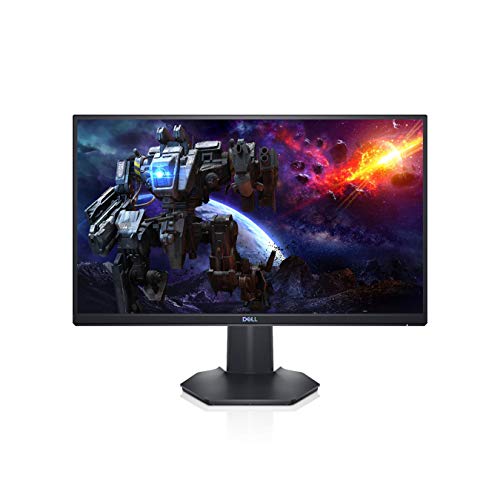
- GET LOST IN THE VIEW: 24" class, 23.8" viewable Dell gaming monitor with 1920 x 1080 Full HD Resolution
- STUTTER-FREE GAMING MONITOR: AMD FreeSync Premium technology adds another layer of seamless gameplay by eliminating screen tearing and stuttering
- IF LOOKS COULD KILL: A 3-sided narrow bezel creates expansive views, plus unique vents located in the back keep everything cool while working hard
Pros
- 144Hz refresh rate with 1ms response delivers butter-smooth gaming visuals
- AMD FreeSync Premium eliminates screen tearing and stuttering
- 24-inch 1080p is the competitive-gaming standard used in esports tournaments
Cons
- TN panel has limited viewing angles and color accuracy
- No USB-C or built-in hub for productivity use
Social proof: See reviews on Amazon
Trade-offs / who should skip: The TN panel washes out when viewed from the side, making it poor for collaborative screen-sharing. Skip if you need accurate colors for photo editing or wide viewing angles.
Scores: Performance 5/5 | Color Accuracy 3/5 | Ease of use 4/5 | Value 5/5
Dell SE2725HM 27-Inch FHD IPS — Best Everyday Value
This 27-inch IPS monitor hits the sweet spot between size and affordability. The 100Hz refresh rate is a step up from standard 60Hz panels, and the anti-glare coating handles ambient light well in my home office.
Why it wins: It delivers a large, color-accurate IPS display with 100Hz smoothness at the most affordable price point in this roundup.

- An improved viewing experience: Experience a high 100Hz refresh rate across your work with a TÜV Rheinland 3-star* certified viewing experience coupled with ComfortView Plus.
- High refresh rate: 100Hz refresh rate delivers less flicker, more seamless scrolling and smoother motion.
- ComfortView Plus: Minimizes harmful blue light exposure without sacrificing color accuracy with Dell’s always on, built-in ComfortView Plus.
Pros
- 27-inch IPS panel with 16.7 million colors for a vibrant visual experience
- 100Hz refresh rate noticeably smoother than standard 60Hz budget monitors
- ComfortView Plus technology reduces blue light without distorting colors
Cons
- 1080p at 27 inches means pixels are visible up close
- Limited to HDMI and VGA — no DisplayPort or USB-C
Social proof: See reviews on Amazon
Trade-offs / who should skip: The 1080p resolution shows individual pixels at 27 inches if you sit close to the screen. Skip if you need sharp text for code or spreadsheet-heavy work — go 4K instead.
Scores: Performance 3/5 | Color Accuracy 4/5 | Ease of use 5/5 | Value 5/5
Dell P2425H 24-Inch FHD IPS — Best for Professional Setups
The P-series is Dell’s professional line, and this model shows why: a fully adjustable stand with height, tilt, swivel, and pivot, plus a USB 3.0 hub built into the base. I use it in portrait mode for reading documents and it rotates seamlessly.
Why it wins: Its fully adjustable stand and built-in USB hub make it the most ergonomic and connectivity-rich monitor for professional desk setups.

- In-Plane Switching (IPS) Technology - Full HD 1920 x 1080 Resolution - 60 Hz Refresh Rate
- 250 cd/m² Brightness - 5 ms Response Time (GtG) - 16.7 Million Colors
- Ultra-Thin Bezel Design - Tilt/Swivel/Pivot/Height Adjustable - HDMI 1.4 | DisplayPort 1.2 | VGA Inputs
Pros
- Height, tilt, swivel, and pivot adjustments fit any desk and seating position
- Built-in USB 3.0 hub eliminates the need for a separate dock
- IPS panel with consistent color at every angle for collaborative viewing
Cons
- 60Hz refresh rate is not suited for gaming
- 24-inch screen may feel small for multitasking
Social proof: See reviews on Amazon
Trade-offs / who should skip: The 60Hz panel and 24-inch size make this purely a work monitor. Skip if you want a dual-purpose display for gaming or media consumption.
Scores: Performance 4/5 | Color Accuracy 4/5 | Ease of use 5/5 | Value 4/5
Quick compare
- Best for office work: Dell S2721QS 4K
- Best budget: Dell SE2725HM
As an Amazon Associate, I earn from qualifying purchases.