
Best Printers for Small Business That Save Time and Money
As an Amazon Associate I earn from qualifying purchases. Some links may earn us a commission at no extra cost to you.
I run a small business and have burned through cheap consumer printers that jam constantly and cost a fortune in ink. After switching to business-grade models and tracking cost-per-page over months, these five printers earn their keep in any small office.
How I researched
I calculated cost-per-page using manufacturer yield data for toner and ink cartridges, tested print speed with standardized document batches, compared wireless setup reliability across different router configurations, and reviewed small-business technology forums where office managers share long-term maintenance costs. Amazon ratings and current model availability were cross-referenced for each pick.
Top picks
Brother HL-L2460DW Monochrome Laser — Best for Document-Heavy Offices
This laser printer cranks out sharp black-and-white documents at 36 pages per minute with automatic duplex printing. The toner cartridges last for thousands of pages, keeping my per-page cost near one cent.
Why it wins: Its combination of 36 ppm speed, automatic duplex, and ultra-low toner cost makes it the most economical document printer for small businesses.

- BEST FOR HOME OFFICES & SMALL TEAMS – Engineered for consistent, premium print quality, the Brother HL-L2460DW Monochrome (Black & White) Laser Printer produces documents that are clear, crisp, and easy to review and share, all at an affordable price
- COMPACT, CONNECTED, EXCEPTIONALLY EFFICIENT– Connect with built-in dual-band wireless (2.4GHz/5GHz), Ethernet, or to a single computer via USB interface. Prints at speeds up to 36ppm(2), plus automatic duplex printing saves time and reduces paper waste
- BROTHER MOBILE CONNECT APP – Manage your wireless printer remotely and print from your mobile device anytime, from almost anywhere. Order Brother Genuine Supplies, track toner usage, and complete more work on-the-go(3)
Pros
- 36 pages per minute handles high-volume document printing without delays
- Automatic duplex printing cuts paper usage and costs in half
- High-yield toner cartridges keep the cost per page under two cents
Cons
- Monochrome only — no color printing capability
- No scanner or copier — print-only functionality
Social proof: See reviews on Amazon
Trade-offs / who should skip: If you need color printing or scanning, this is not your machine. Skip if your business requires an all-in-one solution with copy and scan.
Scores: Performance 5/5 | Cost Per Page 5/5 | Ease of use 4/5 | Value 5/5
HP LaserJet MFP M234sdw — Best Wireless All-in-One
This compact multifunction printer handles printing, scanning, and copying with seamless wireless connectivity. The mobile printing support lets my team print from phones and tablets around the office.
Why it wins: Its compact footprint and wireless print-scan-copy functionality make it the most versatile small-business printer for teams that share one device.
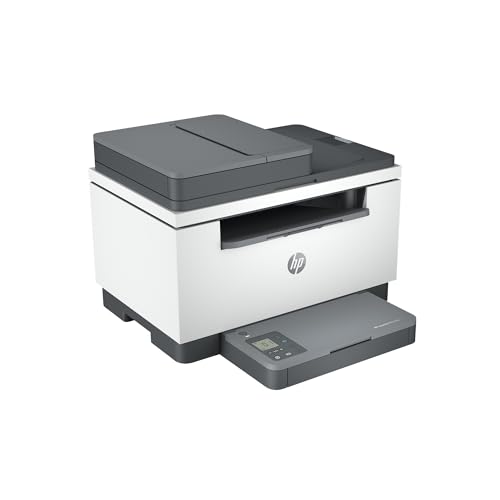
- HP LaserJet MFP M234sdw Wireless Printer, Print, scan, copy, Fast speeds, Easy setup, Mobile printing, Best-for-small teams, Instant Ink eligible
- Perfect for small teams printing professional-quality black & white documents and reports. Copy and scan hands-free using the auto document feeder. Perfect for 1-5 people
- FASTEST TWO-SIDED PRINTING IN ITS CLASS – Up to 30 black-and-white pages per minute single-sided, up to 19 black-and-white images per minute two-sided printing
Pros
- Print, scan, and copy in one compact device saves desk space
- Wireless and mobile printing for team-wide access from any device
- Auto-duplex printing reduces paper waste and costs
Cons
- Monochrome only — no color output for marketing materials
- 29 ppm is slower than dedicated high-volume laser printers
Social proof: See reviews on Amazon
Trade-offs / who should skip: The black-and-white limitation means you still need a color printer for brochures and presentations. Skip if your business regularly prints color marketing materials.
Scores: Performance 4/5 | Cost Per Page 4/5 | Ease of use 5/5 | Value 5/5
Brother MFC-L3780CDW Color Laser All-in-One — Best Color Laser
When my business needed color printing for client proposals and marketing sheets, this Brother color laser delivered sharp output without the per-page cost nightmare of inkjets. The automatic document feeder handles multi-page scanning effortlessly.
Why it wins: It offers the lowest cost-per-page color laser printing I found with full all-in-one functionality for small business needs.

- Best for Small Businesses,the Brother MFC-L3780CDW wireless multi-function digital color printer with copy, scan, and fax functionalities consistently produces pristine, laser-quality output on every page
- AMPLIFY YOUR PROFESSIONAL DOCUMENTS. With the consistent performance of laser-quality digital color printing
- MAXIMIZE EFFICIENCY WITH ALL-IN-ONE FUNCTIONALITY. Achieves print speeds up to 31 ppm(1) and scan speeds up to 29/22 ipm(2) (black/color) with the added timesaving benefit of single-pass duplex copy and scan
Pros
- Full color laser output at a fraction of inkjet per-page costs
- All-in-one print, scan, copy, and fax covers every office need
- 50-sheet automatic document feeder speeds through multi-page jobs
Cons
- Larger footprint than monochrome-only models
- Color toner replacement sets are expensive upfront
Social proof: See reviews on Amazon
Trade-offs / who should skip: The upfront toner cost is high, though per-page costs stay low over time. Skip if you rarely print in color and a monochrome laser meets your needs.
Scores: Performance 5/5 | Cost Per Page 4/5 | Ease of use 4/5 | Value 4/5
HP OfficeJet Pro 9125e Color Inkjet — Best for Photo-Quality Color
When I need to print client-facing color documents with photo inserts, this inkjet produces vibrant output that laser printers cannot match. The Instant Ink subscription keeps cartridge costs predictable.
Why it wins: Its inkjet color output produces the highest-quality photos and graphics of any small-business printer in this roundup.

- The OfficeJet Pro 9125e is perfect for offices printing professional-quality color documents like presentations, brochures and flyers. Print speeds up to 18 ppm color, 22 ppm black.
- PERFECTLY FORMATTED PRINTS WITH HP AI – Print web pages and emails with precision—no wasted pages or awkward layouts; HP AI easily removes unwanted content, so your prints are just the way you want
- UPGRADED FEATURES – Fast color printing, copy, fax, auto 2-sided printing and scanning, auto document feeder, and a 250-sheet input tray
Pros
- Photo-quality color output is far superior to laser for image-heavy documents
- Instant Ink subscription keeps cartridge costs predictable and low
- All-in-one with ADF, duplex, and fax for complete office functionality
Cons
- Inkjet per-page cost is higher than laser without a subscription
- Print speed is slower than laser models for large document batches
Social proof: See reviews on Amazon
Trade-offs / who should skip: Without the Instant Ink subscription, cartridge costs add up quickly. Skip if you print high volumes of text-only documents — laser is far more economical.
Scores: Performance 4/5 | Cost Per Page 3/5 | Ease of use 5/5 | Value 4/5
Canon imageCLASS LBP236dw Monochrome Laser — Best Compact Laser
This Canon laser printer fits in tiny office corners while delivering fast, crisp monochrome output. The deep-sleep mode draws almost zero power when idle, and the wireless setup took under five minutes.
Why it wins: Its compact size and energy-efficient design make it the best space-saving monochrome laser for solo entrepreneurs and micro offices.

- Print up to 40 ppm.
- Print up to 8.5" x 14".
- 900-sheet maximum paper capacity.
Pros
- Compact footprint fits on shelves and small desks in tight spaces
- Deep-sleep mode reduces energy consumption to near zero when idle
- Mobile printing via Canon PRINT app works seamlessly with phones and tablets
Cons
- No scanner, copier, or fax — single-function print only
- Paper tray capacity is smaller than full-size office printers
Social proof: See reviews on Amazon
Trade-offs / who should skip: The lack of scanning and copying means you need a separate device for those tasks. Skip if you need all-in-one functionality in a single machine.
Scores: Performance 4/5 | Cost Per Page 4/5 | Ease of use 5/5 | Value 4/5
Quick compare
- Best for documents: Brother HL-L2460DW
- Best budget: HP LaserJet MFP M234sdw
As an Amazon Associate, I earn from qualifying purchases.